> ## Documentation Index
> Fetch the complete documentation index at: https://developer.kodexa.ai/llms.txt
> Use this file to discover all available pages before exploring further.
# Working with Options
> Complete reference for Kodexa Options, including how to define configuration parameters, capture user input, and build flexible component customization.
Options are a powerful feature in Kodexa that allow you to define configuration parameters for components, capture user input, and enable flexible customization of behavior. They provide a declarative way to create configuration interfaces without writing UI code.
## Quick Start
Options appear throughout Kodexa in metadata definitions for assistants, models, taxonomies (data definitions), actions, and pipeline steps. Here's a simple example:
```yaml theme={null}
options:
- name: hostname
type: string
label: Server Hostname
description: The hostname or IP address of the server
required: true
- name: port
type: number
label: Port Number
description: The port number for the connection
default: 22
```
This creates two configuration fields that users can fill in, and the values are passed to your code at runtime.
## How Users Experience Options
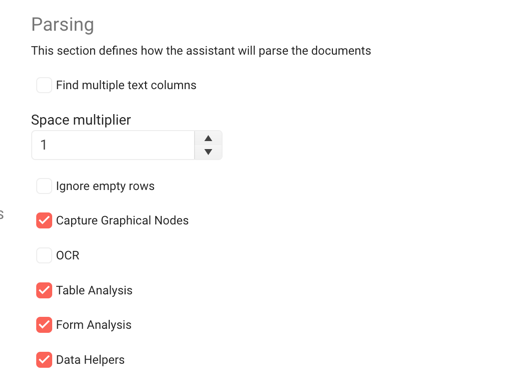
Options create interactive configuration interfaces in several areas:
### Assistant Configuration
When users add an assistant to their project, they can configure it through options you define:
 ### Document Labeling Properties
When labeling documents, users can set properties on labels based on options defined in your taxonomy:
### Document Labeling Properties
When labeling documents, users can set properties on labels based on options defined in your taxonomy:
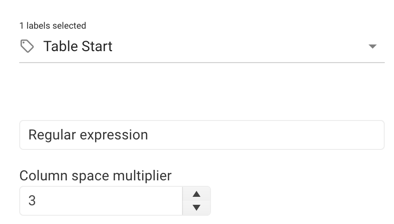 Options keep users focused on content while configuring the system to their needs.
## Complete Option Types Reference
Kodexa supports 24+ option types organized into categories:
### Basic Input Types
#### string / text
A text input field with optional multiline support.
```yaml theme={null}
options:
- name: description
type: string
label: Description
description: Enter a description
placeholder: Type here...
```
**Configuration:**
* `lines` (number): Number of lines for multiline input (default: 1)
* `password` (boolean): Mask input as password field (default: false)
* `placeholder` (string): Placeholder text when empty
**Special Features:**
* Password fields integrate with organization secrets
* Automatically switches between text input and textarea based on `lines`
* Secret references stored as `${secret.secretName}`
**Example with multiline:**
```yaml theme={null}
- name: notes
type: string
label: Notes
description: Additional notes
lines: 5
placeholder: Enter detailed notes here
```
#### number
Numeric input with optional constraints.
```yaml theme={null}
options:
- name: timeout
type: number
label: Timeout (seconds)
description: Request timeout in seconds
default: 30
min: 1
max: 300
```
**Configuration:**
* `min` (number): Minimum allowed value
* `max` (number): Maximum allowed value
* `step` (number): Increment/decrement step (default: 1)
#### boolean
Checkbox or toggle switch for true/false values.
```yaml theme={null}
options:
- name: enabled
type: boolean
label: Enable Feature
description: Enable this feature
default: false
```
**Special Features:**
* View mode displays color-coded badges (green for true, gray for false)
* Can specify custom labels for true/false states
#### select
Dropdown selection from predefined values.
```yaml theme={null}
options:
- name: format
type: select
label: Output Format
description: Choose the output format
possibleValues:
- label: JSON
value: json
- label: CSV
value: csv
- label: XML
value: xml
```
**Configuration:**
* `possibleValues`: Array of `{label, value}` objects
* `multiple` (boolean): Allow multiple selections (default: false)
### Code & Script Types
#### code
Full code editor with syntax highlighting.
```yaml theme={null}
options:
- name: transform_script
type: code
label: Transform Script
description: Python script to transform data
language: python
height: 400px
default: |
def transform(data):
return data
```
**Configuration:**
* `language` (string): Programming language for syntax highlighting (default: "python")
* `height` (string): Editor height (default: "300px")
**Special Features:**
* Full code editor experience
* View mode renders as formatted `
Options keep users focused on content while configuring the system to their needs.
## Complete Option Types Reference
Kodexa supports 24+ option types organized into categories:
### Basic Input Types
#### string / text
A text input field with optional multiline support.
```yaml theme={null}
options:
- name: description
type: string
label: Description
description: Enter a description
placeholder: Type here...
```
**Configuration:**
* `lines` (number): Number of lines for multiline input (default: 1)
* `password` (boolean): Mask input as password field (default: false)
* `placeholder` (string): Placeholder text when empty
**Special Features:**
* Password fields integrate with organization secrets
* Automatically switches between text input and textarea based on `lines`
* Secret references stored as `${secret.secretName}`
**Example with multiline:**
```yaml theme={null}
- name: notes
type: string
label: Notes
description: Additional notes
lines: 5
placeholder: Enter detailed notes here
```
#### number
Numeric input with optional constraints.
```yaml theme={null}
options:
- name: timeout
type: number
label: Timeout (seconds)
description: Request timeout in seconds
default: 30
min: 1
max: 300
```
**Configuration:**
* `min` (number): Minimum allowed value
* `max` (number): Maximum allowed value
* `step` (number): Increment/decrement step (default: 1)
#### boolean
Checkbox or toggle switch for true/false values.
```yaml theme={null}
options:
- name: enabled
type: boolean
label: Enable Feature
description: Enable this feature
default: false
```
**Special Features:**
* View mode displays color-coded badges (green for true, gray for false)
* Can specify custom labels for true/false states
#### select
Dropdown selection from predefined values.
```yaml theme={null}
options:
- name: format
type: select
label: Output Format
description: Choose the output format
possibleValues:
- label: JSON
value: json
- label: CSV
value: csv
- label: XML
value: xml
```
**Configuration:**
* `possibleValues`: Array of `{label, value}` objects
* `multiple` (boolean): Allow multiple selections (default: false)
### Code & Script Types
#### code
Full code editor with syntax highlighting.
```yaml theme={null}
options:
- name: transform_script
type: code
label: Transform Script
description: Python script to transform data
language: python
height: 400px
default: |
def transform(data):
return data
```
**Configuration:**
* `language` (string): Programming language for syntax highlighting (default: "python")
* `height` (string): Editor height (default: "300px")
**Special Features:**
* Full code editor experience
* View mode renders as formatted `` block
* Scrollable with max-height in view mode
#### script / pythonScript / javascript
Script input for code snippets.
```yaml theme={null}
options:
- name: validation_script
type: script
label: Validation Script
description: Script to validate data
required: true
default: |
return {
"valid": true
}
```
### Platform Resource Types
#### documentStore
Select a document store from the project.
```yaml theme={null}
options:
- name: source_store
type: documentStore
label: Source Document Store
description: Select the document store to process
required: true
```
#### moduleStore
Select a module store from the project.
```yaml theme={null}
options:
- name: module
type: moduleStore
label: Module Store
description: Select the module to use
required: true
```
#### tableStore
Select a data store from the project.
```yaml theme={null}
options:
- name: output_store
type: tableStore
label: Output Data Store
description: Select where to store extracted data
required: true
```
#### taxonomyStore
Select a taxonomy (data definition) from the project.
```yaml theme={null}
options:
- name: taxonomy
type: taxonomyStore
label: Data Definition
description: Select the taxonomy to use
required: true
```
#### workspace
Select a workspace from available workspaces.
```yaml theme={null}
options:
- name: workspace
type: workspace
label: Workspace
description: Select the target workspace
required: true
```
**Configuration:**
* `showDescription` (boolean): Show workspace description (default: true)
### Document & Content Types
#### document
Search and select a specific document.
```yaml theme={null}
options:
- name: template_document
type: document
label: Template Document
description: Select a document to use as template
required: true
```
**Special Features:**
* Live search with autocomplete
* Shows document path in results
* Returns `storeRef/documentId` format
* Configurable page size for results
#### data-form
Select a data form configuration from the project.
```yaml theme={null}
options:
- name: form
type: data-form
label: Data Form
description: Select the data form configuration
required: true
```
### Taxonomy & Label Types
#### taxon
Select a taxonomy element (data element).
```yaml theme={null}
options:
- name: root_element
type: taxon
label: Root Data Element
description: Select the root data element
required: true
```
**Configuration:**
* `onlyGroups` (boolean): Show only group taxons (default: false)
* `allowEmpty` (boolean): Allow empty selection (default: true)
* `filterable` (boolean): Enable filtering (default: true)
**Special Features:**
* Hierarchical taxonomy navigation
* Case-insensitive search across label and parent label
* Custom dropdown item rendering
#### taxon\_label
Select a taxonomy label.
```yaml theme={null}
options:
- name: label_type
type: taxon_label
label: Label Type
description: Select the label type to use
required: true
```
#### taxon-lookup
Hierarchical taxonomy search with full path display.
```yaml theme={null}
options:
- name: target_taxon
type: taxon-lookup
label: Target Data Element
description: Search and select a data element
taxonomyTypes:
- CONTENT
- MODEL
showFullPath: true
```
**Configuration:**
* `taxonomyTypes` (array): Types of taxonomies to include (default: \["CONTENT", "MODEL"])
* `showFullPath` (boolean): Show full taxonomy path (default: true)
**Special Features:**
* Flattens taxonomy tree for search
* Displays full path with parent labels
* Chip-based display with custom styling
* Excludes METADATA value paths
#### taxon\_with\_properties
Select a taxonomy element and configure its properties.
```yaml theme={null}
options:
- name: field_config
type: taxon_with_properties
label: Field Configuration
description: Select field and configure properties
taxonomyTypes:
- CONTENT
- MODEL
additionalOptions:
- name: required
type: boolean
label: Required Field
- name: validation
type: select
label: Validation Rule
possibleValues:
- label: None
value: none
- label: Numeric
value: numeric
```
**Configuration:**
* `taxonomyTypes` (array): Types of taxonomies to include
* `additionalOptions` (array): Nested options for the selected taxon
**Special Features:**
* Two-tier configuration (selection + properties)
* Tabbed interface for additional options
* Recursive option rendering
* Stores both tag path and options object
### Status Types
#### documentStatus
Select a document status from the project.
```yaml theme={null}
options:
- name: target_status
type: documentStatus
label: Target Status
description: Status to apply to documents
required: true
```
#### attributeStatus
Select an attribute status from the project.
```yaml theme={null}
options:
- name: attribute_status
type: attributeStatus
label: Attribute Status
description: The attribute status to use
required: true
```
**Configuration:**
* `clearable` (boolean): Allow clearing the selection (default: true)
#### taskStatus
Select a task status from the project.
```yaml theme={null}
options:
- name: task_status
type: taskStatus
label: Task Status
description: Select the task status
required: true
```
**Special Features:**
* Color-coded badges with dynamic background colors
* Contrasting text color based on background
* Custom item rendering in dropdown
#### task-templates
Select a task template from the project.
```yaml theme={null}
options:
- name: template
type: task-templates
label: Task Template
description: Select a task template to apply
required: true
```
**Special Features:**
* Async data loading from project store
* Reactive updates when templates change
### Cloud AI Model Types
#### cloud-model
Select a cloud-based AI model.
```yaml theme={null}
options:
- name: llm_model
type: cloud-model
label: Language Model
description: Select the AI model to use
showDescription: true
showProvider: true
```
**Configuration:**
* `showDescription` (boolean): Show model description as hint (default: true)
* `showProvider` (boolean): Show provider in model name (default: true)
**Special Features:**
* **Local storage caching** (3-minute expiry) to reduce API calls
* Filters non-embedding active models
* Combines model name + provider for display
* Alphabetically sorted
* Paginated results (pageSize: 50)
#### cloud-embedding
Select a cloud embedding model.
```yaml theme={null}
options:
- name: embedding_model
type: cloud-embedding
label: Embedding Model
description: Select the embedding model
showDescription: true
```
**Configuration:**
* `showDescription` (boolean): Show model description (default: true)
**Special Features:**
* Filters for embedding models specifically
* API integration with pagination
* Dynamic loading state
### Pipeline Types
#### pipeline
Configure an entire pipeline with steps.
```yaml theme={null}
options:
- name: processing_pipeline
type: pipeline
label: Processing Pipeline
description: Configure the document processing pipeline
required: true
```
**Special Features:**
* Visual pipeline editor
* Drag-and-drop step ordering
* Step configuration interface
#### pipelineModelOptions
Configure options for models within a pipeline.
```yaml theme={null}
options:
- name: model_configs
type: pipelineModelOptions
label: Model Configurations
description: Configure options for pipeline models
showTabs: true
```
**Configuration:**
* `showTabs` (boolean): Organize options in tabs (default: true)
### Display Types
#### alert
Display an informational alert message.
```yaml theme={null}
options:
- name: info_message
type: alert
label: Information
markdown: |
**Important:** This feature requires additional configuration.
Please ensure you have set up the API credentials before proceeding.
type: info
```
**Configuration:**
* `markdown` (text): Markdown content to display
* `type` (select): Alert style - `info`, `warning`, `error`, `success`
**Special Features:**
* Renders markdown content
* Dynamic styling based on alert type
* Material Design icons
#### article
Display or reference a knowledge base article.
```yaml theme={null}
options:
- name: help_article
type: article
label: Help Documentation
articleId: "12345"
slide: 1
```
**Configuration:**
* `articleId` (string): ID of the article to display
* `text` (text): Direct text content (alternative to articleId)
* `slide` (number): Specific slide number to display
**Special Features:**
* Integrates with knowledge base
* Slide-based navigation support
* Can display by ID or direct text
### Specialized Types
#### chart
Select chart visualization type.
```yaml theme={null}
options:
- name: visualization
type: chart
label: Chart Type
description: Select how to visualize the data
default: bar
```
**Configuration:**
* `type` (select): Chart type - `bar` or `pie`
#### label
Select or enter a document label.
```yaml theme={null}
options:
- name: classification
type: label
label: Document Label
description: The label to apply
multiple: false
```
**Configuration:**
* `multiple` (boolean): Allow multiple label selection (default: false)
**Special Features:**
* Fetches available labels from project
* Custom item rendering
* Supports future multi-select capability
#### simpleExpression
Enter a simple expression that can be evaluated.
```yaml theme={null}
options:
- name: calculation
type: simpleExpression
label: Expression
description: Enter a mathematical expression
default: "3+5"
```
**Special Features:**
* Single-line text input
* Can be evaluated to compute a value
## Working with Lists and Objects
Two of the most powerful option types are `list` and `object`, which allow you to define complex, structured data. Understanding how to use these properly is critical for building flexible configurations.
### List Options
Lists allow you to define arrays of values, either simple strings or complex objects. Use `type: list` with the `listType` parameter to specify what kind of items the list contains.
#### String Lists
For lists of simple string values, use `type: list` with `listType: string`:
```yaml theme={null}
options:
- name: allowed_prefixes
type: list
listType: string
label: Allowed Prefixes
description: List of allowed prefix strings
default:
- income_statement___
- balance_sheet___
- cash_flow___
```
**Key points:**
* `type: list` indicates this is an array
* `listType: string` specifies array items are strings
* `default` should be an array of strings
* Users can add/remove items through the UI
**Resulting value in code:**
```python theme={null}
allowed_prefixes = options.get('allowed_prefixes', [])
# ['income_statement___', 'balance_sheet___', 'cash_flow___']
```
#### Object Lists
For lists of complex objects, use `type: list` with `listType: object` and define the object structure using `groupOptions`:
```yaml theme={null}
options:
- name: sections
type: list
listType: object
label: Document Sections
description: Configure sections to extract from documents
default:
- heading: Executive Summary
required: true
page_limit: 2
- heading: Financial Data
required: true
page_limit: 5
groupOptions:
- name: heading
type: string
label: Section Heading
description: The heading text to look for
required: true
- name: required
type: boolean
label: Required Section
description: Whether this section must be present
default: false
- name: page_limit
type: number
label: Maximum Pages
description: Maximum number of pages for this section
min: 1
max: 50
default: 10
```
**Key points:**
* `type: list` indicates this is an array
* `listType: object` specifies array items are objects
* `groupOptions` defines the schema for each object in the array
* `default` should be an array of objects matching the schema
* Each object in the default must conform to the groupOptions structure
**Resulting value in code:**
```python theme={null}
sections = options.get('sections', [])
# [
# {'heading': 'Executive Summary', 'required': True, 'page_limit': 2},
# {'heading': 'Financial Data', 'required': True, 'page_limit': 5}
# ]
for section in sections:
heading = section.get('heading')
is_required = section.get('required', False)
page_limit = section.get('page_limit', 10)
```
#### Nested Lists in Objects
You can nest lists within objects for complex hierarchical structures:
```yaml theme={null}
options:
- name: field_mappings
type: list
listType: object
label: Field Mappings
description: Define how to map source fields to target fields
groupOptions:
- name: source_field
type: string
label: Source Field Name
required: true
- name: target_field
type: string
label: Target Field Name
required: true
- name: transformations
type: list
listType: string
label: Transformations
description: List of transformations to apply
default:
- trim
- lowercase
```
**Resulting structure:**
```python theme={null}
field_mappings = options.get('field_mappings', [])
# [
# {
# 'source_field': 'CustomerName',
# 'target_field': 'customer_name',
# 'transformations': ['trim', 'lowercase', 'remove_special_chars']
# }
# ]
```
### Object Options
Objects allow you to group related options together. Use `type: object` with `groupOptions` to define the object's properties.
#### Simple Object
```yaml theme={null}
options:
- name: database_config
type: object
label: Database Configuration
description: Database connection settings
properties:
collapsible: true
groupOptions:
- name: host
type: string
label: Database Host
default: localhost
required: true
- name: port
type: number
label: Database Port
default: 5432
min: 1
max: 65535
- name: database_name
type: string
label: Database Name
required: true
- name: use_ssl
type: boolean
label: Use SSL Connection
default: true
```
**Key points:**
* `type: object` indicates this is a structured object
* `groupOptions` defines the properties of the object
* `properties.collapsible: true` makes the group collapsible in the UI
* Each property in `groupOptions` follows the same option structure
**Resulting value in code:**
```python theme={null}
db_config = options.get('database_config', {})
host = db_config.get('host', 'localhost')
port = db_config.get('port', 5432)
database_name = db_config.get('database_name')
use_ssl = db_config.get('use_ssl', True)
```
#### Nested Objects
Objects can contain other objects for deep hierarchical structures:
```yaml theme={null}
options:
- name: api_config
type: object
label: API Configuration
groupOptions:
- name: authentication
type: object
label: Authentication Settings
groupOptions:
- name: method
type: select
label: Auth Method
possibleValues:
- label: API Key
value: api_key
- label: OAuth 2.0
value: oauth2
- name: api_key
type: string
label: API Key
password: true
showIf: "this.api_config.authentication.method === 'api_key'"
- name: oauth_settings
type: object
label: OAuth Settings
showIf: "this.api_config.authentication.method === 'oauth2'"
groupOptions:
- name: client_id
type: string
label: Client ID
- name: client_secret
type: string
label: Client Secret
password: true
```
**Best Practice:** Limit nesting to 2-3 levels maximum for better user experience.
### Default Value Structures
Default values must match the type structure:
| Type | Default Value Structure | Example |
| --------------- | -------------------------------- | ------------------------------ |
| `string` | Single string value | `default: "localhost"` |
| `text` | Single string (can be multiline) | `default: "Line 1\nLine 2"` |
| `number` | Single numeric value | `default: 5432` |
| `boolean` | Single boolean value | `default: true` |
| `select` | Single value from possibleValues | `default: "json"` |
| `list` (string) | Array of strings | `default: ["item1", "item2"]` |
| `list` (object) | Array of objects | `default: [{name: "val"}]` |
| `object` | Object with properties | `default: {host: "localhost"}` |
#### Examples of Correct Default Values
```yaml theme={null}
# String - single value
- name: hostname
type: string
default: "localhost"
# Number - single value
- name: port
type: number
default: 5432
# Boolean - single value
- name: enabled
type: boolean
default: true
# Select - single value (must match a possibleValue)
- name: format
type: select
default: "json"
possibleValues:
- label: JSON
value: json
- label: CSV
value: csv
# List of strings - array of strings
- name: tags
type: list
listType: string
default:
- production
- verified
- active
# List of objects - array of objects
- name: endpoints
type: list
listType: object
default:
- url: "https://api1.example.com"
timeout: 30
- url: "https://api2.example.com"
timeout: 60
groupOptions:
- name: url
type: string
- name: timeout
type: number
# Object - object with properties
- name: connection
type: object
default:
host: "localhost"
port: 5432
ssl: true
groupOptions:
- name: host
type: string
- name: port
type: number
- name: ssl
type: boolean
```
### Anti-Patterns to Avoid
#### ❌ DON'T: Use text fields for lists
```yaml theme={null}
# WRONG - Using multiline text for what should be a list
- name: allowed_values
type: text
lines: 5
default: |
- value1
- value2
- value3
```
#### ✅ DO: Use proper list type
```yaml theme={null}
# CORRECT - Use type: list with listType
- name: allowed_values
type: list
listType: string
default:
- value1
- value2
- value3
```
**Why this matters:**
* Lists provide structured data that's easy to validate
* Users get proper UI controls (add/remove buttons)
* Code receives properly typed arrays, not strings that need parsing
* Validation and error handling are automatic
#### ❌ DON'T: Use text for structured data
```yaml theme={null}
# WRONG - Using text for object-like data
- name: config
type: text
default: |
host: localhost
port: 5432
ssl: true
```
#### ✅ DO: Use object type
```yaml theme={null}
# CORRECT - Use type: object with groupOptions
- name: config
type: object
groupOptions:
- name: host
type: string
default: localhost
- name: port
type: number
default: 5432
- name: ssl
type: boolean
default: true
```
#### ❌ DON'T: Mix default value structure with type
```yaml theme={null}
# WRONG - Default doesn't match list type
- name: items
type: list
listType: string
default: "item1,item2,item3" # Should be an array!
```
#### ✅ DO: Match default structure to type
```yaml theme={null}
# CORRECT - Default is an array matching listType
- name: items
type: list
listType: string
default:
- item1
- item2
- item3
```
### Real-World Example: Comprehensive Configuration
Here's a complete example showing lists, objects, and nesting:
```yaml theme={null}
options:
- name: processing_config
type: object
label: Processing Configuration
groupOptions:
# String list
- name: allowed_file_types
type: list
listType: string
label: Allowed File Types
description: File extensions to process
default:
- pdf
- docx
- txt
# Object with nested settings
- name: validation_rules
type: object
label: Validation Rules
properties:
collapsible: true
groupOptions:
- name: min_file_size
type: number
label: Minimum File Size (KB)
default: 1
min: 0
- name: max_file_size
type: number
label: Maximum File Size (MB)
default: 50
min: 1
max: 500
# List of objects
- name: extraction_rules
type: list
listType: object
label: Extraction Rules
description: Define rules for extracting data
default:
- field_name: invoice_number
pattern: "INV-\\d{6}"
required: true
- field_name: date
pattern: "\\d{4}-\\d{2}-\\d{2}"
required: true
groupOptions:
- name: field_name
type: string
label: Field Name
required: true
- name: pattern
type: string
label: Regex Pattern
description: Regular expression pattern to match
required: true
- name: required
type: boolean
label: Required Field
default: false
- name: transformations
type: list
listType: string
label: Transformations
description: Post-extraction transformations
default:
- trim
- uppercase
```
**Accessing this in code:**
```python theme={null}
def __init__(self, options):
# Get the processing config object
config = options.get('processing_config', {})
# Get string list
allowed_types = config.get('allowed_file_types', [])
# ['pdf', 'docx', 'txt']
# Get nested object
validation = config.get('validation_rules', {})
min_size = validation.get('min_file_size', 1)
max_size = validation.get('max_file_size', 50)
# Get object list
extraction_rules = config.get('extraction_rules', [])
for rule in extraction_rules:
field = rule.get('field_name')
pattern = rule.get('pattern')
required = rule.get('required', False)
transforms = rule.get('transformations', [])
# Process each rule
self.add_extraction_rule(field, pattern, required, transforms)
```
## Option Groups
Options can be nested into groups for better organization and user experience:
```yaml theme={null}
options:
- name: database_settings
type: object
label: Database Settings
description: Configure database connection
properties:
collapsible: true
groupOptions:
- name: host
type: string
label: Database Host
required: true
default: "localhost"
- name: port
type: number
label: Database Port
default: 5432
- name: database_name
type: string
label: Database Name
required: true
- name: use_ssl
type: boolean
label: Use SSL Connection
default: true
```
**Benefits of grouping:**
* Organizes related options together
* Can be made collapsible to reduce UI clutter
* Creates a hierarchy of configuration
* Improves user experience for complex configurations
**Properties for groups:**
* `collapsible: true` - Makes the group expandable/collapsible in the UI
## Providing Possible Values
Limit user input to specific choices using `possibleValues`:
```yaml theme={null}
- name: output_format
type: string
label: Output Format
description: The format of the exported data
possibleValues:
- label: JSON
value: json
- label: CSV
value: csv
- label: Excel Spreadsheet
value: xlsx
- label: XML
value: xml
default: json
```
This creates a dropdown with only these four options. Users cannot enter free-form text.
## Conditional Visibility
Use `showIf` to show/hide options based on other values:
```yaml theme={null}
options:
- name: use_authentication
type: boolean
label: Require Authentication
default: false
- name: username
type: string
label: Username
showIf: "this.use_authentication === true"
- name: password
type: string
label: Password
password: true
showIf: "this.use_authentication === true"
```
The `username` and `password` options only appear when `use_authentication` is checked.
**showIf syntax:**
* JavaScript expression evaluated against current option values
* Access other options via `this.optionName`
* Supports boolean logic: `&&`, `||`, `!`
* Comparison operators: `===`, `!==`, `>`, `<`, `>=`, `<=`
**Complex example:**
```yaml theme={null}
- name: deployment_type
type: select
label: Deployment Type
possibleValues:
- label: Cloud
value: cloud
- label: On-Premise
value: on_premise
- name: cloud_region
type: select
label: Cloud Region
showIf: "this.deployment_type === 'cloud'"
possibleValues:
- label: US East
value: us_east
- label: EU West
value: eu_west
- name: server_address
type: string
label: Server Address
showIf: "this.deployment_type === 'on_premise'"
```
## Developer-Only Options
Hide advanced options from regular users:
```yaml theme={null}
- name: debug_logging
type: boolean
label: Enable Debug Logging
description: Output detailed debug logs
developerOnly: true
default: false
```
Options marked with `developerOnly: true` are only visible to users who have enabled "Show Developer Tools" in their settings.
## Feature Flags
Gate options behind feature flags:
```yaml theme={null}
- name: experimental_feature
type: boolean
label: Enable Experimental Feature
description: Try out our new experimental feature
featureFlag: experimental_features
default: false
```
The option only appears if the specified feature flag is enabled for the project or organization.
## Common Option Properties
All options support these common properties:
| Property | Type | Description | Required |
| ---------------- | ------- | ------------------------------------------------ | ------------------- |
| `name` | string | Unique identifier for the option | Yes |
| `type` | string | Option type (determines UI control) | Yes |
| `label` | string | User-facing display name | Yes |
| `description` | string | Help text explaining the option | Yes |
| `required` | boolean | Whether the value is mandatory | No (default: false) |
| `default` | any | Pre-filled default value | No |
| `possibleValues` | array | Allowed values (for select types) | No |
| `showIf` | string | JavaScript expression for conditional visibility | No |
| `developerOnly` | boolean | Only show to developers | No (default: false) |
| `featureFlag` | string | Feature flag that must be enabled | No |
| `properties` | object | Additional metadata (e.g., `collapsible`) | No |
## Best Practices
### 1. Provide Clear Labels and Descriptions
```yaml theme={null}
# Good
- name: max_retries
label: Maximum Retry Attempts
description: Number of times to retry failed operations before giving up. Set to 0 to disable retries.
# Poor
- name: max_retries
label: Retries
description: Max retries
```
### 2. Use Appropriate Types
Match the option type to the kind of data you're collecting:
```yaml theme={null}
# Good
- name: port
type: number
min: 1
max: 65535
# Poor
- name: port
type: string
```
**Important:** For lists and structured data, use proper `list` and `object` types instead of text fields. See the [Anti-Patterns section](#anti-patterns-to-avoid) in "Working with Lists and Objects" for detailed examples.
### 3. Set Sensible Defaults
```yaml theme={null}
- name: timeout
type: number
label: Request Timeout (seconds)
description: How long to wait for a response
default: 30 # Most users won't need to change this
min: 1
max: 300
```
### 4. Group Related Options
```yaml theme={null}
- name: connection_settings
type: object
label: Connection Settings
properties:
collapsible: true
groupOptions:
- name: host
type: string
- name: port
type: number
- name: timeout
type: number
```
### 5. Use Required Judiciously
Only mark options as `required: true` if the component truly cannot function without them:
```yaml theme={null}
- name: api_key
type: string
label: API Key
required: true # Cannot work without this
- name: log_level
type: select
label: Log Level
required: false # Has a default
default: info
```
### 6. Leverage Conditional Visibility
Keep the UI clean by hiding irrelevant options:
```yaml theme={null}
- name: use_proxy
type: boolean
label: Use HTTP Proxy
default: false
- name: proxy_url
type: string
label: Proxy URL
showIf: "this.use_proxy === true"
- name: proxy_username
type: string
label: Proxy Username
showIf: "this.use_proxy === true"
```
## Using Options in Code
### Python (Assistants/Modules)
```python theme={null}
class MyAssistant:
def __init__(self, options):
# Options are passed as a dictionary
self.hostname = options.get('hostname')
self.port = options.get('port', 22) # With default
self.use_ssl = options.get('use_ssl', False)
# Nested options from groups
db_settings = options.get('database_settings', {})
self.db_host = db_settings.get('host', 'localhost')
self.db_port = db_settings.get('port', 5432)
def run(self, context):
# Use the configured values
connection = connect(
host=self.hostname,
port=self.port,
ssl=self.use_ssl
)
```
### Validation Example
```python theme={null}
def __init__(self, options):
# Validate required options
if 'api_key' not in options:
raise ValueError("api_key is required")
# Validate value ranges
timeout = options.get('timeout', 30)
if timeout < 1 or timeout > 300:
raise ValueError("timeout must be between 1 and 300")
self.api_key = options['api_key']
self.timeout = timeout
```
## Summary
Options are Kodexa's declarative configuration system. By defining options in metadata, you:
* **Enable user configuration** without writing UI code
* **Provide type-safe input** with automatic validation
* **Create consistent experiences** across all components
* **Capture custom information** tailored to your needs
* **Keep configuration co-located** with component definitions
The Options system supports 24+ different types, from simple text inputs to complex taxonomy selectors with nested properties. Master options to build flexible, user-configurable components that integrate seamlessly into the Kodexa platform.
## Related Documentation
* **[Options Architecture](/guides/reference/options-architecture)**: Deep dive into how the options system works
* **[Advanced Options Features](/guides/reference/options-advanced-features)**: Complex patterns and advanced techniques
* **[Defining an Assistant](/concepts/defining_an_assistant)**: Using options in assistant definitions
* **[Data Definitions](/guides/data-definitions/taxonomy-guide)**: Using options to add properties to data elements